R
Ravi the Revenue-Focused
Persona · Paid promotion / "Promote My App" gap
Chapter 1 of 7 · Microsoft Store Discoverability

Meet Ravi,
the dev willing to pay.

Indie dev. Free productivity app, live 4 months. Organic discovery isn't working. He has $200/month of his own money to spend. On Apple he uses Apple Ads Basic; on Google he uses App Campaigns — both self-serve in the same console he manages his app from.

On Microsoft Store, the equivalent doesn't exist. No "Promote My App" button in Partner Center.

Apple Ads Basic: self-serve in App Store Connect
Google App Campaigns: 5 networks from one campaign
MS "Promote My App" button: none
MS Store Ads: contact sales
Ravi · indie dev with budget
feeling: tried organic, wants to spend to be discovered
What Ravi does on each store today
Apple
Opens Apple Ads Basic inside App Store Connect. "Promote an App" → choose app, countries, monthly budget, suggested CPI. Save.
Google
Opens Google Ads → New campaign → App promotion. One campaign serves on Search + Play + YouTube + Discover + Display Network.
Microsoft
No Promote My App surface in Partner Center. The canonical program (App Campaigns) lives behind a 9-question Interest Form. You apply, you wait.

"No 'Promote My App'
button anywhere."

"There is no 'Promote My App' button anywhere in the developer experience."

Ravi opens Partner Center expecting a "Promote My App" button. There isn't one. The product surface he'd use to spend money doesn't exist where he'd look for it.

Microsoft has paid programs — just not in Partner Center, and not where an indie dev's first $200/month can land in minutes.

"Promote My App" in Partner Center: none
Self-serve for indie devs: no
App Campaigns entry: 9-question form, then wait
Wait time to start: up to 6+ months
MICROSOFT STORE ADS · FEB 2023 BLOG
"Ask your marketing team to reach out to their Microsoft Advertising account manager or Microsoft Store representative."
A real program. Not self-serve. Gated by a sales contact.
APP CAMPAIGNS · INTEREST FORM (LIVE TODAY)
9-question Microsoft Form. Asks for Company name, then "Estimated Monthly Budget for Microsoft App campaigns" with options "Less than $10,000 / $10,000 or more / Unsure", then "When would you expect to begin?" with options up to "6+ months".
A real program. Form collects budget tier + start-time signal, then onboards on Microsoft's timeline.

No Promote My App
button. Anywhere.

Ravi's journey today
Step 1
Opens Partner Center. Searches for "promote", "ads", "campaign".
Step 2 · the pain
No button.
No surface. No link. No nav entry.
Step 3
Leaves Partner Center. Google-searches Microsoft blogs. Finds 3 paid paths — all outside, all gated.
Three programs.
Zero in Partner Center.
The 3 paths Ravi finds, in order
Path 1 · the web ad platform
Microsoft Advertising
Self-serve ad platform at ads.microsoft.com. Serves Bing search, MSN feed, Outlook. You bring the link (e.g. your Store listing) and build the ad yourself.
Gate: separate console + 5-step wizard (asset group → targeting → budget → account → payment). You do the building.
Path 2 · ads INSIDE the Store
Microsoft Store Ads · Feb 2023
Sponsored placements inside the Microsoft Store with "Ad" label.
Gate: "Ask your marketing team to reach out to their account manager or Store representative."
Path 3 · across Microsoft surfaces
App Campaigns program · May 2025
One budget → Microsoft auto-runs your ad across Store + Bing + MSN + Outlook. You give the app, MS picks the placements. (Same idea as Google App Campaigns.)
Gate: 9-question Interest Form at aka.ms/appcampaigns. Asks for company name, monthly budget (Less than $10k / $10k+ / Unsure), and start-time (ASAP to 6+ months). You apply, you wait.

Apple: 4 fields, instant.
Google: 5 networks, one campaign.
We: no button in Partner Center.

Apple Ads Basic · "Promote an App"Source: ads.apple.com/app-store/help/apple-ads-basic
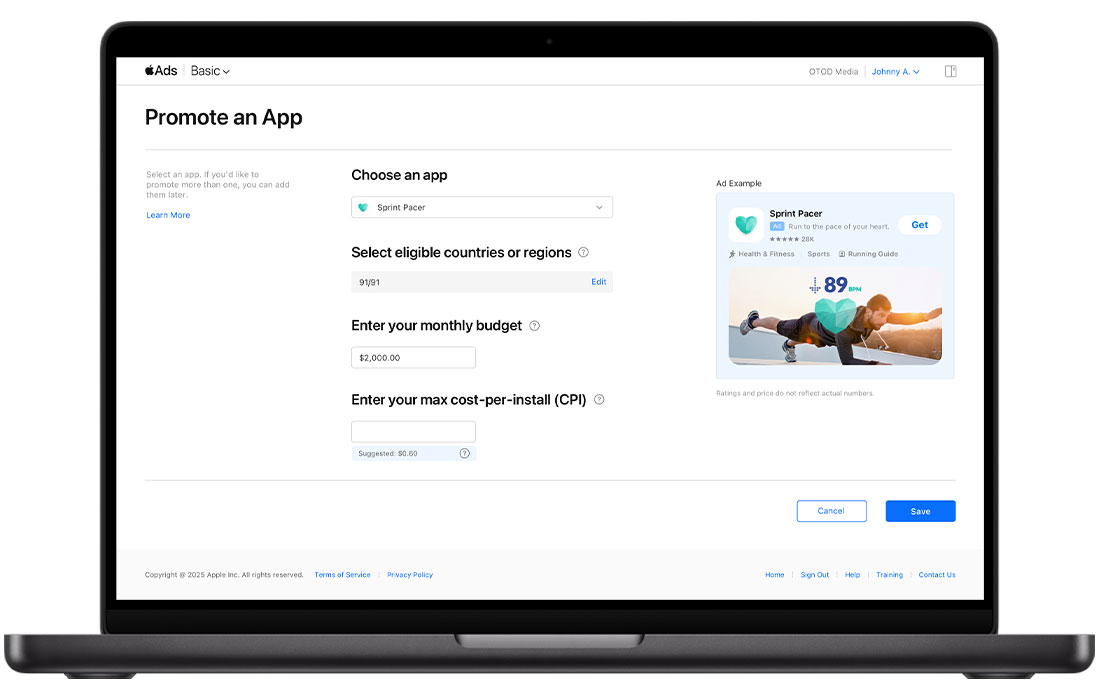
Real Apple Ads Basic Promote an App page screenshot. Four fields: Choose an app (Sprint Pacer), Select eligible countries (91/91), Enter monthly budget ($2,000), Enter max cost-per-install (suggested $0.60). Save button. Ad preview pane on the right.
What this is in one row
1
Choose app
2
Countries
3
Monthly budget
4
Max CPI (suggested)
Click Save → live. No survey. No sales team. No minimum budget. Up to 50 apps per account. Apple automates targeting + creative from existing App Store assets.
GOOGLE ADS · APP CAMPAIGNS
One campaign reaches five networks.
Google Ads → New campaign → "App promotion" → pick platform → budget → assets. From a single setup, the campaign serves on:
Search
google.com
Play
search + related + homepage
YouTube
in-video + relevant pages
Discover
Google Discover feed
Display
Gmail + AdMob + sites
Source: Google Ads Help · support.google.com / google-ads / answer / 6247380
Apple App Store
4 fields
Apple Ads Basic · one click in App Store Connect
Google Play
5 networks
Google Ads · one App Campaign reaches all
Microsoft Store
No button
No "Promote My App" surface in Partner Center; paid programs gated outside
Entry · how Ravi starts a campaign
Self-serve dashboard inside the store console
No minimum budget
Live within minutes
Reach · where the ad runs
In-Store ad placements (Search / Home / rails)
°
Cross-network reach from one campaign
°
°
Optimisation · can Ravi tune it
Install-conversion bid optimisation
Per-keyword Store install attribution

Three moves.
One entry point.

Move 1
"Promote My App" button in Partner Center.
Single entry point on the app Overview page. No interest form, no Google-searching old blogs.
Move 2
Skip the Interest Form for small budgets.
App Campaigns Interest Form asks budget tier (less / more than $10k / unsure) + start time (up to 6+ months). Auto-onboard indie devs with under-$10k budgets — live the same hour, like Apple Ads Basic.
Move 3
4 fields, not 5 steps.
App Campaigns + Microsoft Advertising both run on a 5-step wizard. Replace with Apple-Basic 4-field form for indie devs. Power users can still drop into the full wizard.

What ships when

P0 · this sprint
Move 1.
Add the button. Zero algorithmic work.
P1 · 1Q
Move 2.
Drop the budget floor & collapse 5 steps to 4 fields.
P2 · 2Q
Move 3.
Ship the Apple-Basic 4-field form inside Partner Center.

Paid acquisition as a two-way revenue loop.

Today · budget routed to rivals

1 · Ravi has the budget
Wants to spend on MS Store.
2 · Platform gates him
App Campaigns Interest Form asks budget tier + when you'd start (up to 6+ months). Indie devs apply and wait.
3 · Routes spend elsewhere
Pays Google App Campaigns instead. Drives MS Store installs through Google.
4 · MS loses on both sides
No ad revenue from indie devs. Indies trained to skip MS in their media plan.

After the four moves · budget stays, revenue flows

1 · Self-serve dashboard
"Promote My App" in Partner Center. 4 fields. Live in minutes.
2 · Ravi spends with us
First time MS captures the ad spend instead of routing devs to rivals.
3 · Indie devs join the funnel
$1/day campaigns supported. Long tail of indie devs now bringing budgets MS never captured before.
4 · Loop closes both ways
Devs spend on MS → install velocity climbs → organic rank improves → ad CPMs rise. MS earns. Devs earn. Catalog wakes up.

A new Promote page
inside Partner Center.

One place to spend ad budget on Microsoft surfaces — self-serve, 4-field form, live the same hour, no Interest Form to fill.
Microsoft Partner Center
Home > Insights > Promote
Overview
Apps and games
Summary
Acquisitions
Add-on acquisitions
Usage
Health
Reviews
Highlights
Insights
Product page experiments
Promote
Create campaign
XDP Analytics
Download reports
Downloads hub
Promote Apps and games
DownloadShareNotifications
Last 30 days ▾
Market: All ▾
Promote is in preview. Run paid campaigns across Microsoft Store Ads, App Campaigns, and Microsoft Advertising from a single self-serve dashboard.Send feedback
FocusDrop Timer
Overview — last 30 days
Active campaigns
View details
Paid campaigns currently delivering impressions
3
Spend
View details
Total ad spend across all networks
$840
Paid installs
View details
Attributed installs from your campaigns
312
Cost per install
View details
Spend ÷ attributed installs
$2.69
Your campaigns
CampaignNetworkDaily budgetSpend (30d)InstallsCPIStatus
FocusDrop — US launchMicrosoft Store Ads$15$420168$2.50ACTIVE
FocusDrop — UK / CAApp Campaigns (Open Beta)$10$280112$2.50ACTIVE
FocusDrop — Bing searchMicrosoft Advertising$5$14032$4.38ACTIVE
FocusDrop — Q1 burstMicrosoft Store Ads$25$1,820720$2.53Ended
Microsoft Store Ads is your best ROI at $2.50 CPI. Bing search is converting at $4.38 — double the CPI — worth reviewing keyword bids or pausing.
Available ad networks
Microsoft Store Ads
SELF-SERVE
Sponsored placements inside the Microsoft Store, labelled "Ad". Reaches users already browsing for apps.
App Campaigns
OPEN BETA · INTEREST FORM
One campaign delivered across Microsoft Store, Bing, MSN, and Outlook from one budget — MS picks the placements.
Microsoft Advertising
SELF-SERVE
Bing search, MSN feed, and Outlook ads pointing to your Store listing.